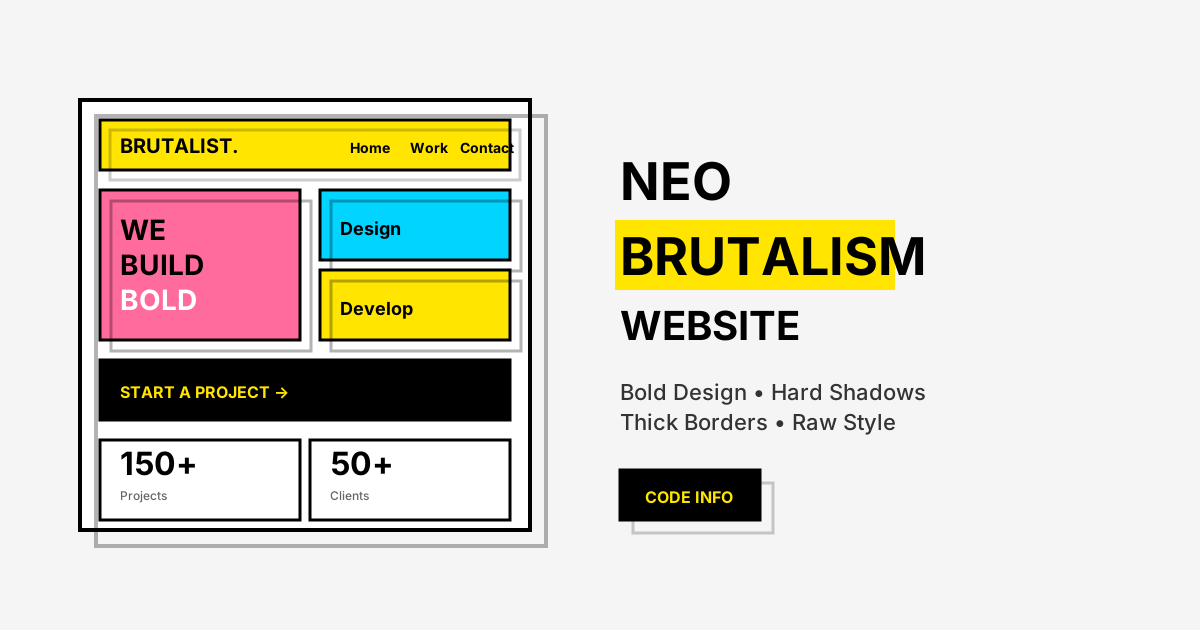
Neo Brutalism (also called Neubrutalism) has emerged as one of the most distinctive web design trends in 2025. This bold, unapologetic design style breaks away from the polished minimalism that dominated the web for years. In this comprehensive tutorial, you'll learn how to create a Neo Brutalism website with HTML and CSS that's fully responsive and visually striking.
What is Neo Brutalism Design?
Neo Brutalism is a modern design movement inspired by the architectural Brutalist style of the 1950s-70s. In web design, it's characterized by raw, bold aesthetics that prioritize function over decorative polish. Unlike the soft gradients and subtle shadows of contemporary design, neubrutalism embraces harshness and contrast.
The term "Brutalism" comes from the French "béton brut" meaning "raw concrete." In digital design, this translates to raw, unrefined visual elements that feel honest and direct.
Key Characteristics of Neo Brutalism
Before diving into the code, let's understand what makes a neubrutalism website distinctive:
1. Bold, High-Contrast Colors
Neo Brutalist designs use vibrant, often clashing colors. Think bright yellows, hot pinks, electric blues, and stark blacks. There's no fear of color here.
2. Hard Shadows (No Blur)
Instead of soft drop shadows, neo brutalism uses hard-edged shadows with zero blur. These create a distinctive "offset" or "floating" effect:
3. Thick Black Borders
Heavy black outlines (2-4px) around elements are a signature of the style. These create clear visual boundaries and add to the raw aesthetic.
4. Bold Typography
Large, heavy typefaces dominate neo brutalist designs. Sans-serif fonts like Inter, Space Grotesk, or even monospace fonts are popular choices.
5. No or Minimal Border Radius
While some neubrutalist designs use slight rounding, many embrace sharp, rectangular corners that reinforce the raw, blocky feel.
6. Asymmetrical Layouts
Grids in neo brutalism often feel intentionally "off" or unconventional, breaking the predictable patterns of traditional web layouts.
7. Visible Grid Lines and Borders
Unlike minimal designs that hide structure, neo brutalism often showcases dividing lines and grid boundaries as design elements.
Why Choose Neo Brutalism for Your Website?
The brutalist web design approach offers several advantages:
Stand Out from the Crowd
In a sea of similar-looking websites, neo brutalism immediately grabs attention. It's memorable and distinctive.
Improved Usability
The high contrast and clear visual hierarchy actually improve readability and navigation. There's no ambiguity about what's clickable or important.
Faster Loading
The style relies on CSS rather than heavy images, gradients, or animations. This means faster page loads and better performance.
Authenticity
Neo brutalism feels honest and unpretentious. It's popular with creative agencies, startups, and brands that want to project confidence and originality.
Famous Examples of Neo Brutalism
Several major brands and websites have embraced the neubrutalism trend:
- Figma - Uses bold colors and hard shadows throughout their interface
- Gumroad - Features the classic neo brutalist aesthetic with yellow accents
- Notion - Incorporates brutalist elements in their illustrations
- Linear - Uses high contrast and bold typography
Building a Neo Brutalism Website
Now let's build a complete responsive neo brutalism website from scratch. Our example will include:
- Navigation header
- Hero section with CTA
- Features/services grid
- Testimonial cards
- Footer
Step 1: Setting Up the HTML Structure
Create the basic HTML structure with semantic elements. Include a header with navigation, main content area with hero section, features grid, and footer.
Step 2: Defining the Color Palette with CSS Variables
Set up your color scheme using CSS custom properties. Neo brutalism uses bold, high-contrast colors.
Step 3: Creating the Hard Shadow Effect
Apply the signature neo brutalist shadow with zero blur. This creates the distinctive "floating" look.
Step 4: Styling Interactive Elements
Add hover states that enhance the brutalist aesthetic with transform effects.
Step 5: Making It Responsive
Use media queries to adapt the layout for different screen sizes while maintaining the bold aesthetic.
Breaking Down the Design
The Color Palette
Our neo brutalist website uses this bold color scheme:
| Color | Hex Code | Usage |
|---|---|---|
| Yellow | #FFE500 | Primary accent, CTAs |
| Pink | #FF6B9D | Secondary accent |
| Blue | #00D4FF | Highlights |
| Black | #000000 | Borders, text, shadows |
| White | #FFFFFF | Backgrounds |
| Off-white | #F5F5F5 | Section backgrounds |
Typography Choices
For authentic neo brutalism typography, we use:
- Headings: Bold, large sans-serif (700-900 weight)
- Body: Clean sans-serif for readability
- Accents: Occasionally monospace for code-like elements
The Shadow System
The signature hard shadow effect is achieved with:
This creates the illusion of elements "lifting" on hover.
Border Treatment
Thick black borders define every element:
Responsive Design Approach
Our responsive neo brutalism website adapts to all screen sizes:
Desktop (1024px+)
- Multi-column layouts
- Larger typography
- Full shadow effects
Tablet (768px - 1023px)
- 2-column grids
- Adjusted spacing
- Maintained visual impact
Mobile (below 768px)
- Single column layout
- Stacked navigation
- Touch-friendly buttons
- Reduced shadow offset
CSS Variables for Easy Customization
The code uses CSS custom properties for easy theming:
Change these values to create your own neo brutalist color scheme.
Best Practices for Neo Brutalism
1. Maintain Readability
Despite the bold aesthetics, text must remain readable. Ensure sufficient contrast between text and background colors.
2. Use White Space
Even raw designs need breathing room. Don't overcrowd elements just because the style is bold.
3. Keep Navigation Clear
The brutalist aesthetic shouldn't compromise usability. Navigation should remain intuitive.
4. Test on Mobile
Hard shadows and thick borders can feel overwhelming on small screens. Adjust values for mobile.
5. Consider Accessibility
High contrast is generally good for accessibility, but test color combinations with contrast checkers.
Animation Tips
Neo brutalism animations should feel snappy and direct:
Avoid bouncy or elastic animations - they contradict the raw aesthetic.
When to Use Neo Brutalism
Neo brutalism design works best for:
- Creative agencies - Show personality and creativity
- Startups - Stand out and appear innovative
- Portfolio sites - Make your work memorable
- SaaS products - Modern, forward-thinking image
- Event websites - Create excitement and energy
- Editorial/blogs - Bold statement pieces
When to Avoid
- Corporate/enterprise sites requiring conservative aesthetics
- Medical or financial services needing trust signals
- E-commerce with large product catalogs
- Audiences unfamiliar with modern design trends
Browser Compatibility
The CSS techniques used in neo brutalism websites have excellent browser support:
- Box-shadow: All modern browsers
- CSS Grid: 95%+ support
- CSS Variables: 95%+ support
- Transform: All modern browsers
No polyfills or fallbacks required for modern audiences.
Frequently Asked Questions
What is neo brutalism in web design?
Neo brutalism (or neubrutalism) is a web design trend characterized by bold colors, hard shadows without blur, thick black borders, large typography, and an intentionally raw, unpolished aesthetic. It's inspired by architectural Brutalism.
Is neo brutalism good for SEO?
Yes, neo brutalism websites can be excellent for SEO. The style relies on CSS rather than heavy images, resulting in fast load times. The high contrast and clear hierarchy also improve user experience metrics.
How do I create hard shadows in CSS?
To create neo brutalism hard shadows, use box-shadow with 0 blur:
The format is: offset-x, offset-y, blur (0 for hard), color.
What colors work best for neo brutalism?
Popular neubrutalism colors include bright yellow (#FFE500), hot pink (#FF6B9D), electric blue (#00D4FF), lime green (#BFFF00), and orange (#FF6600). Always pair with black borders and shadows for contrast.
Can neo brutalism be accessible?
Yes! The high contrast nature of neo brutalism can actually improve accessibility. However, always test color combinations for WCAG compliance and ensure interactive elements are clearly distinguishable.
Conclusion
Neo Brutalism offers a refreshing departure from the polished sameness of modern web design. With its bold colors, hard shadows, and unapologetic rawness, it creates memorable, high-impact websites that stand out.
Key takeaways from this tutorial:
- Hard shadows (0 blur) define the neo brutalist aesthetic
- Thick black borders create clear visual boundaries
- Bold, contrasting colors make the design pop
- Large typography adds to the raw, impactful feel
- Responsive design ensures the style works on all devices
Use the complete code example as a starting point for your own neo brutalism website and customize the colors to match your brand.
Related Tutorials
- Bento Grid Layout with HTML and CSS
- Neon Glow Button Effects with CSS
- Modern Website UI Design with HTML and CSS
- CSS :has() Selector Tutorial
If this neo brutalism tutorial helped you, share it with fellow designers and follow Code Info for more web design trends and tutorials!