An admin panel is a crucial part of any web application, allowing users to manage data, track statistics, and perform administrative tasks. Whether you're building an e-commerce dashboard, a CMS, or a business analytics tool, having a well-structured admin panel enhances productivity and user experience.
In this guide, we will walk you through the process of building an admin panel with HTML and CSS. You'll learn how to create a visually appealing and functional interface with a sidebar menu, statistics cards, and a responsive layout—all without using complex frameworks or JavaScript.
Why Build an Admin Panel with HTML and CSS?
Using HTML and CSS to build an admin panel offers several advantages:
-
Lightweight and Fast: No need for heavy JavaScript libraries, making it quick and responsive.
-
Customizable UI: Full control over the design, colors, and layout.
-
Mobile-Friendly: CSS media queries ensure a responsive design that works across devices.
-
Beginner-Friendly: A great project to practice frontend development skills.
Essential Features of an Admin Panel
Before building your admin panel, let's look at some must-have features:
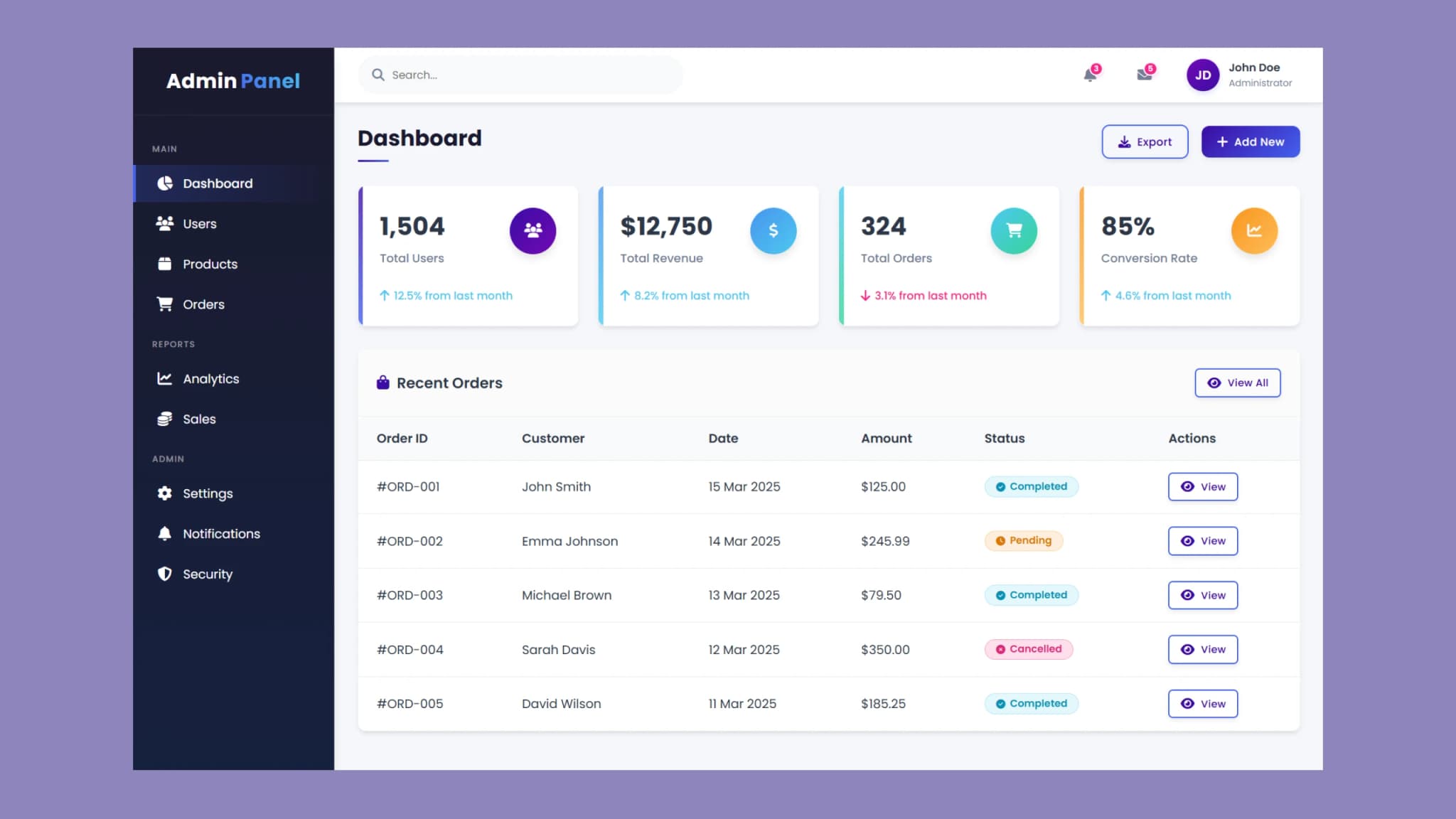
1. Sidebar Navigation
A sidebar provides easy access to different sections, such as:
-
Dashboard
-
Users
-
Products
-
Orders
-
Reports & Analytics
-
Settings
2. Header with Search and Notifications
A top header enhances user navigation and includes elements like:
-
A search bar for quick data lookup
-
Notifications and messages for real-time alerts
-
User profile section for managing account settings
3. Dashboard with Statistics Cards
The dashboard should display key metrics using statistic cards. Examples:
-
Total Users: Displays the number of registered users.
-
Total Revenue: Shows sales figures.
-
Total Orders: Tracks completed and pending orders.
-
Conversion Rate: Helps analyze business growth.
4. Recent Orders Table
A data table displaying the latest transactions or user activities is an essential part of any admin panel. It should include:
-
Order ID
-
Customer Name
-
Date
-
Amount
-
Status (Completed, Pending, Cancelled)
5. Responsive Design
A good admin panel should be mobile-friendly, ensuring that it works on different screen sizes.
Steps to Create an Admin Panel with HTML and CSS
Step 1: Set Up the Basic Layout
Start by structuring your admin panel using HTML divs and containers. Organize the sidebar, header, and main content sections properly.
Step 2: Design the Sidebar Menu
Use CSS Flexbox to create a modern and easy-to-navigate sidebar. Add icons and highlight active menu items for a better user experience.
Step 3: Style the Dashboard and Cards
Apply CSS to make statistic cards visually appealing. Use background colors, box shadows, and hover effects for a clean and modern look.
Step 4: Add a Table for Recent Orders
Use CSS to style tables neatly so that they remain readable on all devices. Add hover effects and buttons for actions like viewing details.
Step 5: Make It Responsive
Use CSS media queries to ensure the admin panel adapts to different screen sizes. A collapsible sidebar for mobile screens improves usability.
For more CSS best practices, check out W3Schools.
Best Practices for Building an Admin Panel
Here are some tips to enhance the UI and usability of your admin panel:
-
Use a Clean Design: Avoid clutter by keeping the UI simple and easy to navigate.
-
Choose a Consistent Color Scheme: Use a professional palette that suits the application.
-
Add Hover and Click Effects: Improve user interaction with smooth transitions and animations.
-
Ensure Readability: Use clear fonts and proper spacing for better content visibility.
-
Optimize for Speed: Minimize excessive CSS styles and optimize images for a faster dashboard.
Source code
If you like this design, then feel free to use it. Copy the code by clicking on Copy button provided below. First, you have to create two files. One of them is HTML and the other is JS after creating these files, paste the code provided below.
Conclusion
Building an admin panel with HTML and CSS is an excellent way to create a functional and stylish dashboard without relying on complex libraries. By following the steps outlined in this guide, you can develop a responsive and user-friendly admin panel tailored to your needs.
Whether you're managing an e-commerce store, business analytics, or a content management system, a well-designed admin panel improves workflow and data management.