Mar 14, 20254 min read

How to Make a Food Dashboard with HTML and CSS

Make a food dashboard with HTML and CSS. Build restaurant analytics with order tracking, revenue monitoring, and performance goals UI.

How to Make a Food Dashboard with HTML and CSS

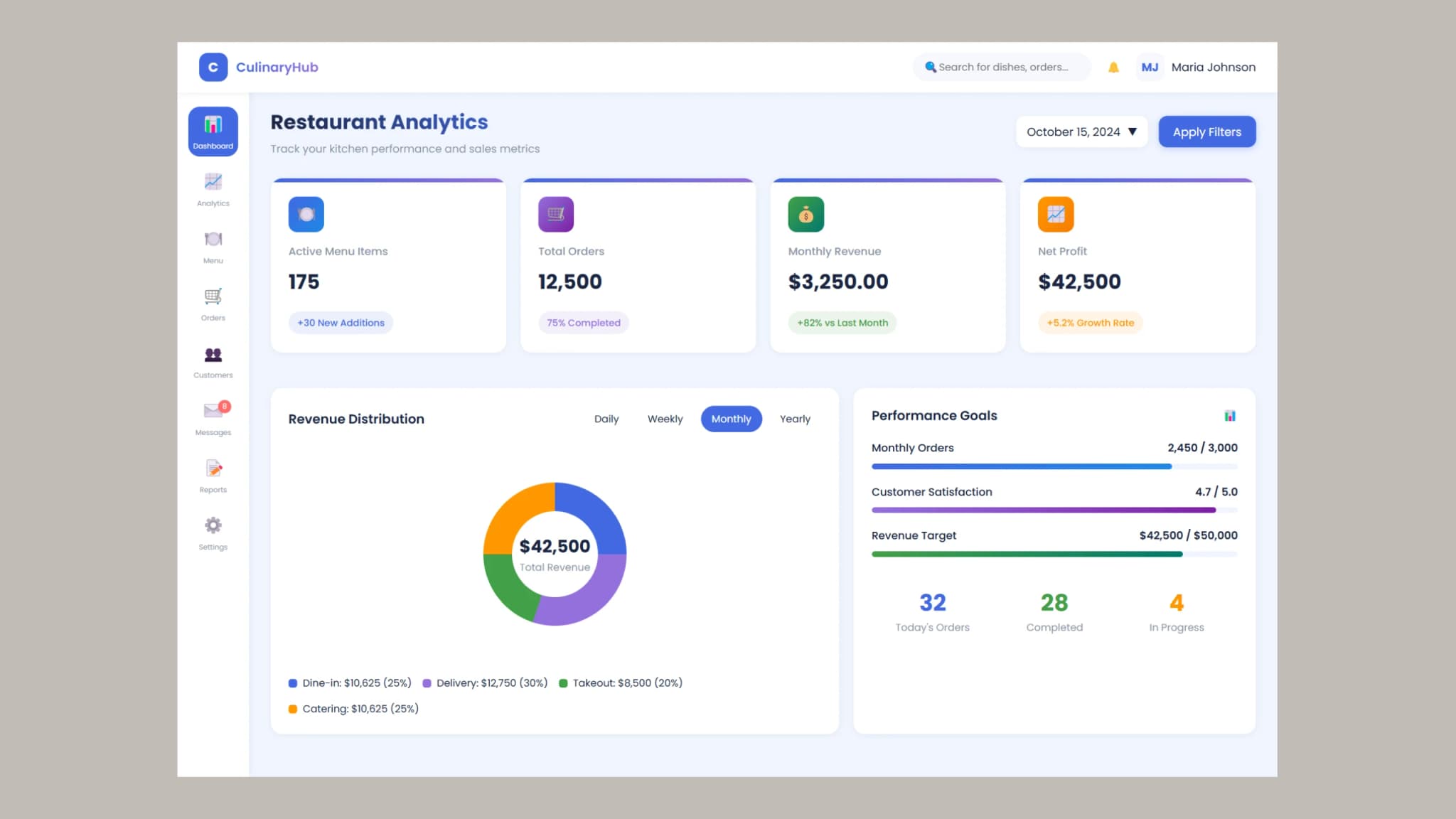
A food dashboard is an essential tool for restaurant owners, chefs, and managers to monitor sales, orders, and customer interactions. Whether you are running a restaurant, cloud kitchen, or catering business, a dashboard helps you track key performance indicators in real time.

In this guide, we will build a food dashboard using HTML and CSS. The dashboard will feature a sidebar menu, analytics cards, revenue tracking, and performance goals, ensuring a clean and user-friendly UI without using JavaScript or complex frameworks. checkout this fast food dashboard with HTML, CSS and JavaScript.

Why Create a Food Dashboard with HTML and CSS?

Building a food dashboard with HTML and CSS provides multiple benefits:

  • Lightweight and Fast: Avoids unnecessary JavaScript overhead for a snappy experience.

  • Customizable: You have complete control over colors, layouts, and styling.

  • Mobile-Friendly: Ensures that the dashboard works across different screen sizes using CSS media queries.

  • Great for Beginners: Helps enhance frontend development skills with real-world practice.

Key Features of a Food Dashboard

1. Sidebar Navigation

A sidebar allows easy access to essential sections like:

  • Dashboard

  • Analytics

  • Menu Management

  • Orders

  • Customers

  • Messages

  • Reports

  • Settings

2. Header with Search and Notifications

The header bar enhances navigation and includes:

  • Search bar: Quickly find orders, customers, or menu items.

  • Notifications: Stay updated on new orders or alerts.

  • User Profile: Manage user account settings with an avatar display.

3. Quick Stats Section

The dashboard highlights important restaurant metrics with statistic cards:

  • Active Menu Items: Number of dishes available.

  • Total Orders: Tracks completed and pending orders.

  • Monthly Revenue: Displays restaurant earnings.

  • Net Profit: Shows financial performance over time.

4. Revenue Distribution Chart

A donut chart visually represents revenue sources like dine-in, delivery, takeout, and catering.

5. Performance Goals

A progress tracking section shows business performance metrics such as:

  • Monthly Orders

  • Customer Satisfaction Ratings

  • Revenue Targets

Steps to Build a Food Dashboard with HTML and CSS

Step 1: Create the Basic Layout

Use HTML div containers to structure the sidebar, header, and main content sections.

Step 2: Design the Sidebar Menu

Apply CSS Flexbox to arrange menu items with icons, ensuring a clean and professional look.

Step 3: Style the Dashboard Metrics

Use CSS grids to position stat cards, each displaying key data points with badges for growth insights.

Step 4: Implement the Revenue Chart

Use CSS styling to design a circular chart, showing revenue breakdowns for different sales channels.

Step 5: Add Responsive Design

Implement CSS media queries to adjust the layout for tablets and mobile devices, ensuring usability across all screen sizes.

Best Practices for Building a Food Dashboard

  • Keep the UI Clean: Prioritize a minimalist layout with easy navigation.

  • Ensure Color Contrast: Use colors effectively to highlight critical data.

  • Make It Interactive: Add hover effects for better engagement.

  • Optimize for Performance: Minimize heavy styles and ensure fast loading times.

Source code

If you like this design, then feel free to use it. Copy the code by clicking on Copy button provided below. First, you have to create two files. One of them is HTML and the other is CSS after creating these files, paste the code provided below.

How to Make a Food Dashboard with HTML and CSS
1<!DOCTYPE html>
2<html lang="en">
3 <head>
4 <meta charset="UTF-8" />
5 <meta name="viewport" content="width=device-width, initial-scale=1.0" />
6 <title>CulinaryHub Dashboard</title>
7 <link rel="stylesheet" href="style.css" />
8 </head>
9 <body>
10 <!-- Header Bar -->
11 <div class="header-bar">
12 <div class="brand-container">
13 <div class="brand-logo">C</div>
14 <div class="brand-name">CulinaryHub</div>
15 </div>
16
17 <div class="header-actions">
18 <div class="search-bar">
19 <span>🔍</span>
20 <input type="text" placeholder="Search for dishes, orders..." />
21 </div>
22
23 <div>🔔</div>
24
25 <div class="user-profile">
26 <div class="user-avatar">MJ</div>
27 <div>Maria Johnson</div>
28 </div>
29 </div>
30 </div>
31
32 <!-- Sidebar -->
33 <div class="sidebar">
34 <a class="nav-item active">
35 <div class="nav-icon">📊</div>
36 <div class="nav-label">Dashboard</div>
37 </a>
38
39 <a class="nav-item">
40 <div class="nav-icon">📈</div>
41 <div class="nav-label">Analytics</div>
42 </a>
43
44 <a class="nav-item">
45 <div class="nav-icon">🍽️</div>
46 <div class="nav-label">Menu</div>
47 </a>
48
49 <a class="nav-item">
50 <div class="nav-icon">🛒</div>
51 <div class="nav-label">Orders</div>
52 </a>
53
54 <a class="nav-item">
55 <div class="nav-icon">👥</div>
56 <div class="nav-label">Customers</div>
57 </a>
58
59 <a class="nav-item" style="position: relative">
60 <div class="badge">8</div>
61 <div class="nav-icon">✉️</div>
62 <div class="nav-label">Messages</div>
63 </a>
64
65 <a class="nav-item">
66 <div class="nav-icon">📝</div>
67 <div class="nav-label">Reports</div>
68 </a>
69
70 <a class="nav-item">
71 <div class="nav-icon">⚙️</div>
72 <div class="nav-label">Settings</div>
73 </a>
74 </div>
75
76 <!-- Main Content -->
77 <div class="main-content">
78 <!-- Dashboard Header -->
79 <div class="dashboard-header">
80 <div>
81 <h1 class="dashboard-title">Restaurant Analytics</h1>
82 <p class="dashboard-subtitle">
83 Track your kitchen performance and sales metrics
84 </p>
85 </div>
86
87 <div style="display: flex">
88 <div class="date-filter">
89 <span>October 15, 2024</span>
90 <span style="margin-left: 10px"></span>
91 </div>
92
93 <div class="filter-button">
94 <span>Apply Filters</span>
95 </div>
96 </div>
97 </div>
98
99 <!-- Dashboard Grid -->
100 <div class="dashboard-grid">
101 <!-- Quick Stats -->
102 <div class="quick-stats">
103 <div class="stat-card">
104 <div class="stat-icon blue-gradient">🍽️</div>
105 <div class="stat-title">Active Menu Items</div>
106 <div class="stat-value">175</div>
107 <div class="stat-badge badge-blue">+30 New Additions</div>
108 </div>
109
110 <div class="stat-card">
111 <div class="stat-icon purple-gradient">🛒</div>
112 <div class="stat-title">Total Orders</div>
113 <div class="stat-value">12,500</div>
114 <div class="stat-badge badge-purple">75% Completed</div>
115 </div>
116
117 <div class="stat-card">
118 <div class="stat-icon green-gradient">💰</div>
119 <div class="stat-title">Monthly Revenue</div>
120 <div class="stat-value">$3,250.00</div>
121 <div class="stat-badge badge-green">+82% vs Last Month</div>
122 </div>
123
124 <div class="stat-card">
125 <div class="stat-icon orange-gradient">📈</div>
126 <div class="stat-title">Net Profit</div>
127 <div class="stat-value">$42,500</div>
128 <div class="stat-badge badge-orange">+5.2% Growth Rate</div>
129 </div>
130 </div>
131
132 <!-- Revenue Chart -->
133 <div class="revenue-chart-container">
134 <div class="chart-header">
135 <div class="chart-title">Revenue Distribution</div>
136 <div class="period-tabs">
137 <div class="period-tab">Daily</div>
138 <div class="period-tab">Weekly</div>
139 <div class="period-tab active">Monthly</div>
140 <div class="period-tab">Yearly</div>
141 </div>
142 </div>
143
144 <div class="revenue-chart">
145 <div class="circular-chart">
146 <div class="donut-chart">
147 <div class="donut-hole">
148 <div class="donut-total">$42,500</div>
149 <div class="donut-label">Total Revenue</div>
150 </div>
151 </div>
152 </div>
153 </div>
154
155 <div class="chart-legend">
156 <div class="legend-item">
157 <div class="legend-color" style="background-color: #4169e1"></div>
158 <div>Dine-in: $10,625 (25%)</div>
159 </div>
160 <div class="legend-item">
161 <div class="legend-color" style="background-color: #9370db"></div>
162 <div>Delivery: $12,750 (30%)</div>
163 </div>
164 <div class="legend-item">
165 <div class="legend-color" style="background-color: #43a047"></div>
166 <div>Takeout: $8,500 (20%)</div>
167 </div>
168 <div class="legend-item">
169 <div class="legend-color" style="background-color: #ff9800"></div>
170 <div>Catering: $10,625 (25%)</div>
171 </div>
172 </div>
173 </div>
174
175 <!-- Performance Container -->
176 <div class="performance-container">
177 <div class="chart-header">
178 <div class="chart-title">Performance Goals</div>
179 <div>📊</div>
180 </div>
181
182 <div class="goal-progress">
183 <div class="goal-item">
184 <div class="goal-header">
185 <div class="goal-title">Monthly Orders</div>
186 <div class="goal-value">2,450 / 3,000</div>
187 </div>
188 <div class="progress-bar">
189 <div class="progress progress-blue" style="width: 82%"></div>
190 </div>
191 </div>
192
193 <div class="goal-item">
194 <div class="goal-header">
195 <div class="goal-title">Customer Satisfaction</div>
196 <div class="goal-value">4.7 / 5.0</div>
197 </div>
198 <div class="progress-bar">
199 <div class="progress progress-purple" style="width: 94%"></div>
200 </div>
201 </div>
202
203 <div class="goal-item">
204 <div class="goal-header">
205 <div class="goal-title">Revenue Target</div>
206 <div class="goal-value">$42,500 / $50,000</div>
207 </div>
208 <div class="progress-bar">
209 <div class="progress progress-green" style="width: 85%"></div>
210 </div>
211 </div>
212 </div>
213
214 <div
215 style="
216 display: flex;
217 justify-content: space-between;
218 margin-top: 40px;
219 "
220 >
221 <div style="text-align: center; flex: 1">
222 <div style="font-size: 32px; font-weight: 700; color: #4169e1">
223 32
224 </div>
225 <div style="font-size: 14px; color: #8a94a6">Today's Orders</div>
226 </div>
227
228 <div style="text-align: center; flex: 1">
229 <div style="font-size: 32px; font-weight: 700; color: #43a047">
230 28
231 </div>
232 <div style="font-size: 14px; color: #8a94a6">Completed</div>
233 </div>
234
235 <div style="text-align: center; flex: 1">
236 <div style="font-size: 32px; font-weight: 700; color: #ff9800">
237 4
238 </div>
239 <div style="font-size: 14px; color: #8a94a6">In Progress</div>
240 </div>
241 </div>
242 </div>
243 </div>
244 </div>
245 </body>
246</html>

Conclusion

Building a food dashboard with HTML and CSS is an excellent way to improve restaurant analytics and management. By following this guide, you can design a responsive, interactive, and well-structured dashboard to monitor sales, orders, and performance goals.

Start creating your food dashboard today and enhance the way you track restaurant performance, check out this guide on web performance optimization to ensure your dashboard runs smoothly.

For more frontend tutorials, check out our guide on building an admin panel.